Pixels first: the UK is a digital-first spec
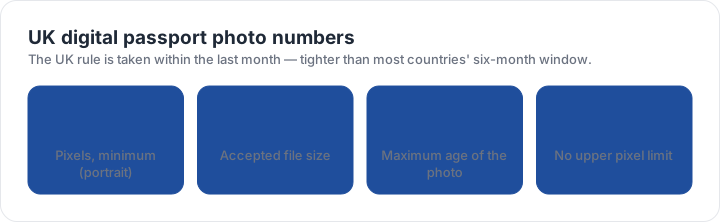
A UK digital photo must be at least 600 pixels wide and 750 pixels high — a portrait proportion, taller than it is wide — and the file must sit between 50 KB and 10 MB. There is no published upper pixel limit, which means a phone photo straight out of the camera usually satisfies the floor without any resizing at all. The usual failure is the other direction: a heavily compressed copy dropped below 50 KB while being sent between devices.
The block behind the file is the standard European portrait: 35 mm wide by 45 mm high, with the head between 29 mm and 34 mm from chin to top of head. The head, shoulders and upper chest are all in the frame, which is a slightly wider crop than a U.S. square allows. Filters are not allowed, and nobody else may appear in the image, even in the background.
One month, not six
The UK rule is that the photograph was taken within the last month. That is five months tighter than most countries, and it catches anyone reusing a photo from an earlier application. It applies to printed and digital submissions alike, and it is stated on the same page as the file rules.
In practice the one-month window makes a small difference to how you prepare: a photograph taken for a different purpose but compliant in every other way is still usable, provided it is recent. It does not make the head band, the background or the no-glasses rule any looser, and the UK asks for glasses to be removed where that can be done without discomfort.
A sharp photo can still be a rejected photo. The rules that send applications back are measurements — the block, the head band, the background lightness — so the fastest check is a measurement, not a second opinion from a friend. The checker takes that measurement from your own file.
Printed and digital are one spec in two units
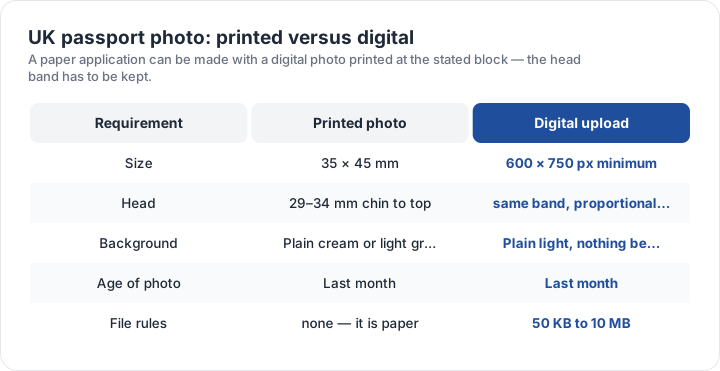
A paper application uses the same composition, printed at 35 × 45 mm: two identical photographs, head 29–34 mm, on a plain cream or light grey background. A digital submission states the same requirements in pixels and kilobytes. Nothing about the face, the light or the framing changes; only the unit does.
That means a single good photograph can serve both. Take the photo once against a plain light wall, keep the large original file, and then produce two outputs: a print at 35 × 45 mm, and a file at 600 × 750 pixels or above within the 50 KB to 10 MB window. The digital comparison page puts the UK window beside the others, and the UK checker preset reads the pixel floor, the file size and the proportional head band from your own file.
Getting a UK photo made
- Choose the routeAny counter, booth, app or a helper with a phone will do — the rule set is the same.
- Use a plain light backgroundCream or light grey for a print; nothing hung on the wall behind you.
- Keep the original fileDo not send the only copy through a messaging app, which compresses it.
- Check the two numbersAt least 600 × 750 pixels, and between 50 KB and 10 MB.
- Check the head band29–34 mm chin to top of head on the 35 × 45 mm block.
If you are printing the photo yourself, print at 300 dpi so the printed block matches the 35 × 45 mm the form expects. A print made from a file that was resized for an upload is often a fraction small — and a fraction is enough to miss a printed box. The questions below cover the cases people ask about most, and the size matrix shows the block beside every other one on this site.
| Requirement | What the official rule says | |||||||
|---|---|---|---|---|---|---|---|---|
| ('Country / document', 'United Kingdom — UK passport — digital photo') | ('Printed size', '35 × 45 mm') | ('Head height', '29–34 mm chin to top of head') | ('Digital upload', '600 × 750 px minimum') | ('File format & size', 'JPG, JPEG, PNG, under 10 MB') | ('Background', 'Plain light-coloured background, no objects behind you') | ('Recency', 'Taken in the last month') | ('Glasses', 'No glasses (remove them if you can do so without discomfort)') | ('Official source', 'Official page') |
| ('Country / document', 'United Kingdom — UK passport — printed photo') | ('Printed size', '35 × 45 mm (1.38 × 1.77 in)') | ('Head height', '29–34 mm chin to top of head') | ('Digital upload', 'Not applicable — this one is filed on paper') | ('File format & size', 'Photo paper, no file limits') | ('Background', 'Plain cream or light grey background') | ('Recency', 'Taken in the last month') | ('Glasses', 'No glasses') | ('Official source', 'Official page') |
Specification source: https://www.gov.uk/photos-for-passports/rules-for-digital-photos · checked October 2026 · HM Passport Office online application.
Specification source: https://www.gov.uk/photos-for-passports/photo-requirements · checked October 2026 · Paper application (form for overseas or postal applications).