The setup, in six steps
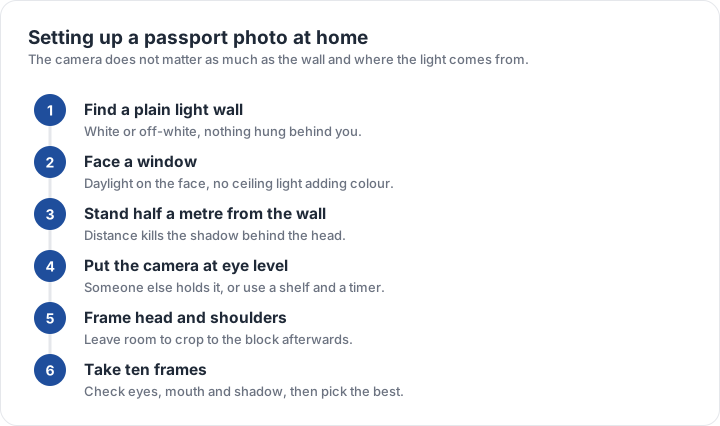
- Find a plain light wallWhite, off-white or very light grey, with nothing hung behind you.
- Face a windowDaylight on your face from the front; turn off the ceiling light.
- Stand half a metre off the wallThe distance is what removes the shadow behind your head.
- Put the camera at eye levelA helper holds it, or use a shelf and the timer.
- Frame head and shouldersLeave room around the head to crop to the block afterwards.
- Take ten framesThen choose one with both eyes open, mouth closed and no shadow.
The camera matters far less than the light. A mid-range phone camera with a clean lens and even daylight will out-perform a good camera shooting into a window, so spend the effort on where the light comes from rather than on the device.
Light that passes and light that fails
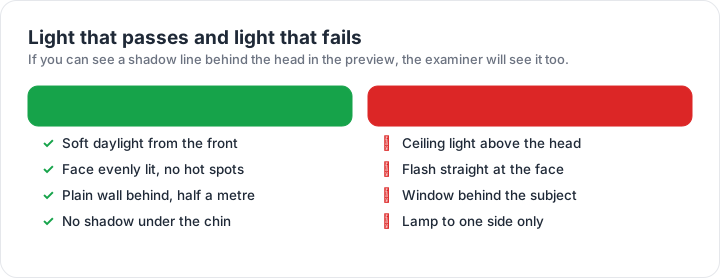
Soft daylight from the front passes: the face is evenly lit, there is no hot spot on the forehead and no shadow under the chin, and the wall behind is half a metre away and lit as well. Failing setups are equally specific. A ceiling light above your head throws a shadow down the face and onto the wall. Flash straight at the face produces a hot, flat image and red eye. A window behind the subject turns the face into a silhouette. A lamp to one side leaves half the face in shade, which looks dramatic and reads as an unevenly lit photograph.
If the day is dull, move closer to the window rather than adding a lamp, and shoot facing the light. If you must use artificial light, use one source and point it at the wall as well as at you, and switch off everything else in the room so there is no colour cast from mixed bulbs.
The checker reports measurements, not approval. It tells you which published rule your file fails and by how much, from the pixels of the file in your browser. The decision always belongs to the authority you file with.
Framing and the head band
Compose wider than you need. Leave space above the head and below the shoulders in the frame, then crop to the exact block afterwards — cropping inward is easy, and recovering a head that touches the edge of the frame is not. The head band is measured on the finished photo, so the crop is where the band is decided.
For a U.S. photo that means a 51 × 51 mm square with the head 25–35 mm from chin to top of head. For a UK or Schengen photo it means a 35 × 45 mm portrait with the head between 29 and 34 mm for the UK, or a face of at least 32 mm for Schengen. The checker will report the proportion of your chosen frame before you commit to a print, and the size matrix lists every block.
Printing at home
A photo shop will print a 4 × 6 inch sheet, which holds six 2 × 2 inch photos with room for borders; a 10 × 15 cm sheet holds the same layout, and a 13 × 18 cm sheet holds more. Ask for the crop you made rather than the full frame, and set the print resolution to 300 dpi so a millimetre on the file is a millimetre on the paper.
Print one copy first and measure it before printing the sheet. A print that is half a millimetre out is not a disaster on a spare, but six identical mistakes is a wasted sheet and a wasted trip. Keep the digital original: a second print from the same file is free, while a second photo session is not. The rejection page lists what to check on the finished print, and the digital rules page covers the file side if you are uploading rather than printing.
| Requirement | What the official rule says | |||||||
|---|---|---|---|---|---|---|---|---|
| ('Country / document', 'United States — U.S. passport — printed photo') | ('Printed size', '51 × 51 mm (2 × 2 in)') | ('Head height', '25–35 mm chin to top of head') | ('Digital upload', 'Not applicable — this one is filed on paper') | ('File format & size', 'Photo paper, no file limits') | ('Background', 'Plain white or off-white, no shadows') | ('Recency', 'Taken within the last 6 months') | ('Glasses', 'No glasses — the rule changed in November 2016') | ('Official source', 'Official page') |
| ('Country / document', 'United Kingdom — UK passport — printed photo') | ('Printed size', '35 × 45 mm (1.38 × 1.77 in)') | ('Head height', '29–34 mm chin to top of head') | ('Digital upload', 'Not applicable — this one is filed on paper') | ('File format & size', 'Photo paper, no file limits') | ('Background', 'Plain cream or light grey background') | ('Recency', 'Taken in the last month') | ('Glasses', 'No glasses') | ('Official source', 'Official page') |
| ('Country / document', 'Europe — Schengen visa — printed photo') | ('Printed size', '35 × 45 mm') | ('Head height', '32–36 mm chin to top of head') | ('Digital upload', 'Not applicable — this one is filed on paper') | ('File format & size', 'Photo paper, no file limits') | ('Background', 'Plain light background') | ('Recency', 'Taken within the last 6 months') | ('Glasses', 'No glasses; eyes must be clearly visible') | ('Official source', 'Official page') |
Specification source: https://travel.state.gov/content/travel/en/passports/how-apply/photos.html · checked October 2026 · DS-11, DS-82 by mail, and any paper application.
Specification source: https://www.gov.uk/photos-for-passports/photo-requirements · checked October 2026 · Paper application (form for overseas or postal applications).