
Which applications take a digital photo
The United States accepts a digital photograph for an online passport renewal and for several immigration forms; the UK passport application is digital-first, with the file rules published as pixels and kilobytes; the OCI application in India takes a square upload plus a separate signature file; and the Diversity Visa entry is digital only, with no printed photo at all.
Where a country accepts both, the photograph is the same and the file is not. A U.S. passport renewal takes a square file from 600 × 600 pixels up to 10 MB, while a U.S. visa form takes a square JPEG no larger than 240 KB. Producing both from one original image is straightforward; producing both from one exported file is not, because the compression needed for the smaller window changes the file the larger window would have accepted.
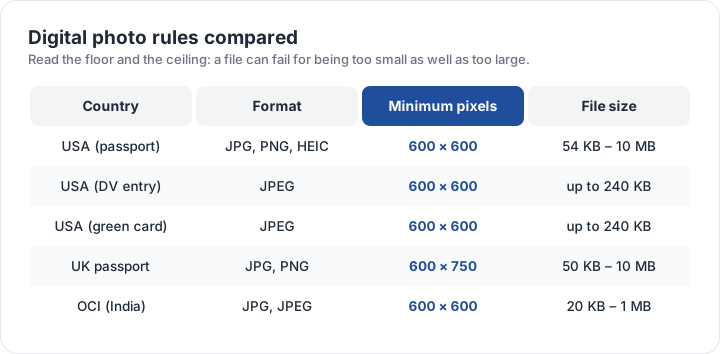
Read the floor and the ceiling
Every digital rule has two numbers, and a file can fail on either. Too few pixels and the upload screen refuses it before a human sees it; too many kilobytes and the form refuses it outright rather than compressing it for you. The floors are usually the more surprising: 54 KB for a U.S. online renewal and 50 KB for the UK mean a heavily optimised copy can be rejected for being too small.
The format list is the third number. A U.S. passport upload accepts JPG, JPEG, PNG, HEIC and HEIF; the DS-160 visa form accepts JPEG only; the UK accepts JPG, JPEG and PNG; and the OCI portal accepts JPG or JPEG. A HEIC file straight from an iPhone is fine for one and refused by the others, which is why exporting to JPEG is the safe default everywhere.
A sharp photo can still be a rejected photo. The rules that send applications back are measurements — the block, the head band, the background lightness — so the fastest check is a measurement, not a second opinion from a friend. The checker takes that measurement from your own file.
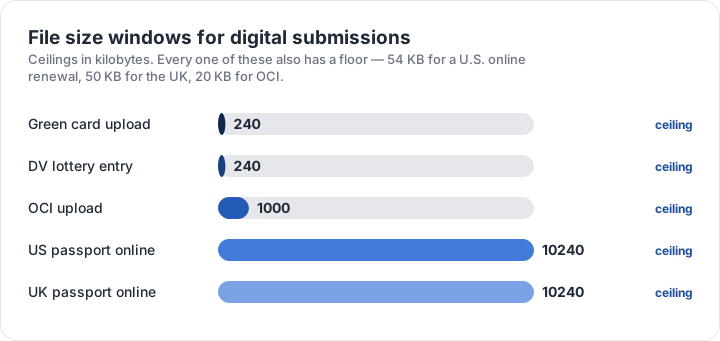
File size windows, side by side
Laid out together, the windows differ by more than an order of magnitude. A U.S. passport renewal and a UK passport upload both allow up to 10 MB. The OCI photo caps at 1 MB. The visa, green card and DV applications all cap at 240 KB — small enough that a phone photo must be compressed rather than merely resized.
Compression is the step that quietly ruins photos. Dropping the quality setting until the file fits can soften the eyes past the point where a face-matching system can use them, so compress in small steps and check the result at full size rather than at thumbnail scale. The DV entry preset in the checker reports the pixel dimensions, aspect ratio and file size from your own file before you attach it to a form.
Preparing one photo for several uploads
- Start from one compliant photographSquare, plain background, head band and recency rules met.
- Keep the largest originalNever overwrite it with a compressed copy — that is the master.
- Crop to the target blockCrop first, then resize; resizing a wrong shape does not fix it.
- Export for each form separatelyDifferent pixel windows and kilobyte ceilings per application.
- Open each file at 100 per centIf the eyes are not crisp at full size, compress less.
Naming the exports after the application they are for saves a surprising amount of time when several forms are filed in one sitting, and it removes the risk of attaching the 240 KB version to the form that allows 10 MB. The size matrix lists the printed blocks that sit behind these files, and the app comparison covers which tools can produce each of these exports without degrading the image.
| Requirement | What the official rule says | |||||||
|---|---|---|---|---|---|---|---|---|
| ('Country / document', 'United States — U.S. passport — digital upload') | ('Printed size', '51 × 51 mm') | ('Head height', '25–35 mm chin to top of head') | ('Digital upload', '600 × 600 px minimum, up to 1200 px') | ('File format & size', 'JPG, JPEG, PNG, HEIC, HEIF, under 10 MB') | ('Background', 'Plain white or off-white, no shadows') | ('Recency', 'Taken within the last 6 months') | ('Glasses', 'No glasses') | ('Official source', 'Official page') |
| ('Country / document', 'United Kingdom — UK passport — digital photo') | ('Printed size', '35 × 45 mm') | ('Head height', '29–34 mm chin to top of head') | ('Digital upload', '600 × 750 px minimum') | ('File format & size', 'JPG, JPEG, PNG, under 10 MB') | ('Background', 'Plain light-coloured background, no objects behind you') | ('Recency', 'Taken in the last month') | ('Glasses', 'No glasses (remove them if you can do so without discomfort)') | ('Official source', 'Official page') |
| ('Country / document', 'United States — DV lottery entry — digital photo') | ('Printed size', '51 × 51 mm') | ('Head height', '25–35 mm chin to top of head') | ('Digital upload', '600 × 600 px minimum, up to 1200 px') | ('File format & size', 'JPG, JPEG, under 0 MB') | ('Background', 'Plain white or off-white background') | ('Recency', 'Taken within the last 6 months') | ('Glasses', 'No glasses') | ('Official source', 'Official page') |
| ('Country / document', 'India — OCI card — printed photo') | ('Printed size', '51 × 51 mm (2 × 2 in)') | ('Head height', '25–35 mm chin to top of head') | ('Digital upload', '600 × 600 px minimum') | ('File format & size', 'JPG, JPEG, under 0 MB') | ('Background', 'Plain white or light background, no shadows') | ('Recency', 'Taken within the last 6 months') | ('Glasses', 'No glasses with tinted lenses; avoid glare') | ('Official source', 'Official page') |
Specification source: https://travel.state.gov/content/travel/en/passports/how-apply/photos.html · checked October 2026 · Online renewal and other digital submissions.
Specification source: https://www.gov.uk/photos-for-passports/rules-for-digital-photos · checked October 2026 · HM Passport Office online application.
Specification source: https://dvprogram.state.gov/ · checked October 2026 · Diversity Visa programme entry.
Specification source: https://ociservices.gov.in/ · checked October 2026 · Overseas Citizen of India application.