Plain and light, in three parts
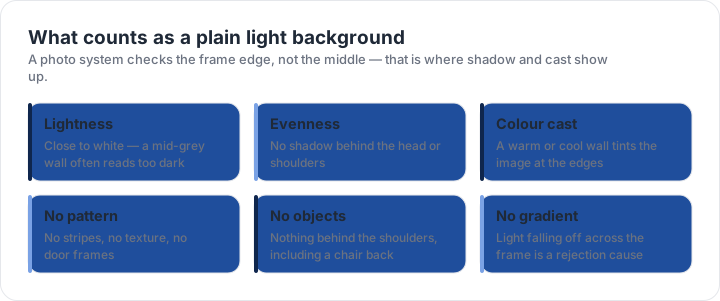
Lightness: close to white. The United States asks for white or off-white; the UK asks for plain cream or light grey; Canada for white or light. A mid-grey or beige wall is lighter than it looks and often fails, because the camera exposes for the face rather than the wall. Evenness: no shadow behind the head or the shoulders, which is what happens when the light source is close, above, or behind you.
Colour cast: a warm or cool wall tints the image, and so does the light. A north-facing window gives a blue cast, a tungsten lamp a yellow one, and a mix of ceiling light and daylight gives a patchy result that is hard to describe and easy to reject. The rule is not about aesthetics; a face-matching system uses the frame edge to separate the head from the background.
Why a white wall reads grey
Exposure is the reason. When a camera exposes for a face, a white wall behind it lands a little darker than white — sometimes two stops darker in a bright room with a dark subject. That is normal and correct for a photograph, and it is exactly what makes a wall that satisfies the eye fail the background rule.
Distance is the other half. Stand close to a wall and your body blocks the light, so the shadow you cast falls directly behind your head. Half a metre of separation is usually enough to move the shadow out of the frame entirely, and it costs nothing but the space behind you. If the room is small, shoot along the wall rather than facing it, so the light comes across your face.
The checker reports measurements, not approval. It tells you which published rule your file fails and by how much, from the pixels of the file in your browser. The decision always belongs to the authority you file with.
Testing your background at home
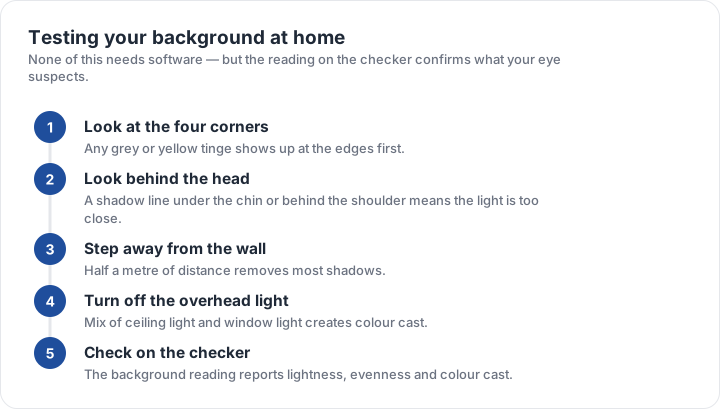
- Look at the four cornersGrey or yellow tinge shows up at the edges before the centre.
- Look behind your headA shadow line means the light is close, above, or on one side.
- Step half a metre off the wallThat distance removes most body shadows in one move.
- Turn off mixed lightCeiling light plus window light is what creates a colour cast.
- Shoot a test frame and inspect itCheck the frame edges at full size, not on a thumbnail.
A digital photograph makes this testable rather than a matter of opinion: the pixels at the border have measurable values, and a background that is too dark or unevenly lit can be reported as a number rather than a suspicion. On this site the checker reports lightness, evenness and colour cast from the frame edge of your file, in your browser.
Fixing the three background faults
Too dark: move away from the wall and add light, or shoot against a whiter surface such as a plain sheet hung flat. Uneven: change the direction of the light so it hits the wall as well as your face, and turn off any overhead light competing with the window. Colour cast: use one light source rather than two, and prefer daylight over a lamp.
What does not work is editing. Brightening the background of a finished photo is retouching, and retouching is itself on the list of rejection reasons in most countries — including the United States, where red-eye removal alone counts as an edit. Fix the light before the shutter, not the pixels afterwards. The rejection page explains where background faults sit in the list of actual returns, and the U.S. checker preset reports the background reading alongside the block and the head band.
| Requirement | What the official rule says | |||||||
|---|---|---|---|---|---|---|---|---|
| ('Country / document', 'United States — U.S. passport — printed photo') | ('Printed size', '51 × 51 mm (2 × 2 in)') | ('Head height', '25–35 mm chin to top of head') | ('Digital upload', 'Not applicable — this one is filed on paper') | ('File format & size', 'Photo paper, no file limits') | ('Background', 'Plain white or off-white, no shadows') | ('Recency', 'Taken within the last 6 months') | ('Glasses', 'No glasses — the rule changed in November 2016') | ('Official source', 'Official page') |
| ('Country / document', 'United Kingdom — UK passport — printed photo') | ('Printed size', '35 × 45 mm (1.38 × 1.77 in)') | ('Head height', '29–34 mm chin to top of head') | ('Digital upload', 'Not applicable — this one is filed on paper') | ('File format & size', 'Photo paper, no file limits') | ('Background', 'Plain cream or light grey background') | ('Recency', 'Taken in the last month') | ('Glasses', 'No glasses') | ('Official source', 'Official page') |
| ('Country / document', 'Canada — Canadian passport — printed photo') | ('Printed size', '50 × 70 mm') | ('Head height', '31–36 mm chin to top of head') | ('Digital upload', 'Not applicable — this one is filed on paper') | ('File format & size', 'Photo paper, no file limits') | ('Background', 'Plain white or light-coloured background') | ('Recency', 'Taken within the last 6 months') | ('Glasses', 'Dark glasses and tinted lenses not accepted; clear prescription glasses must not hide the eyes') | ('Official source', 'Official page') |
| ('Country / document', 'China — Chinese visa — printed photo') | ('Printed size', '33 × 48 mm') | ('Head height', 'Not specified as a fixed band — keep the head centred and uncropped') | ('Digital upload', 'Not applicable — this one is filed on paper') | ('File format & size', 'Photo paper, no file limits') | ('Background', 'Plain white background') | ('Recency', 'Taken within the last 6 months') | ('Glasses', 'No glasses; no headwear except religious headwear') | ('Official source', 'Official page') |
Specification source: https://travel.state.gov/content/travel/en/passports/how-apply/photos.html · checked October 2026 · DS-11, DS-82 by mail, and any paper application.
Specification source: https://www.gov.uk/photos-for-passports/photo-requirements · checked October 2026 · Paper application (form for overseas or postal applications).
Specification source: https://www.canada.ca/en/immigration-refugees-citizenship/services/canadian-passports/photos.html · checked October 2026 · Paper application, 2 identical photos.