How a specification gets onto this site
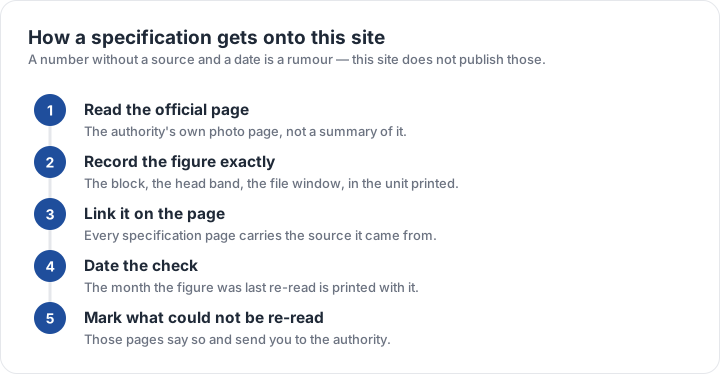
Four steps, applied to every figure published here. Read the official page — the agency’s own photo requirements page rather than a summary of it, and rather than another guide’s table. Record the figure exactly as printed, keeping the unit the authority uses, because a figure translated into another unit on the way in is a figure that can drift.
Link the source on the page that carries the number, so a reader can check it without searching. And date the check: the month a figure was last re-read is printed with it. Photo rules change quietly — the U.S. glasses ban arrived in November 2016, the UK one-month window tightened a recency rule that used to be looser, and online uploads introduced kilobyte floors that did not exist when everyone filed on paper.
Verified and reference: the two labels
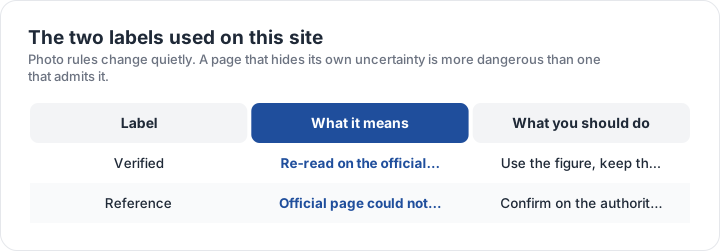
A specification marked verified was re-read on the official page during the latest sweep, and the source link on the page goes to that page. A specification marked reference is one where the official page could not be re-read — because the site was unreachable, or because the rule is published in a form that does not restate the numbers in one place. In those cases the figure shown is the widely published official value, the page says so, and it sends you to the authority to confirm before filing.
A page that hides its own uncertainty is more dangerous than one that admits it. A confident wrong millimetre costs someone a second appointment and another fee, while an admitted gap costs a minute on the authority’s own page. That is why the label and the re-read date sit with the figure rather than in a footnote.
The checker reports measurements, not approval. It tells you which published rule your file fails and by how much, from the pixels of the file in your browser. The decision always belongs to the authority you file with.
What the two labels ask of you
- VerifiedYou can use the figure as published, and the source link is the page it came from.
- ReferenceConfirm the number on the authority’s page before you pay for anything.
- AlwaysThe block printed on your own form beats any chart, including this one.
- If a rule changedWrite to us with the official page; specification errors get fixed first.
One further limit applies to every figure on this site. The specification is what an authority publishes; the decision is what its examiner applies. A photo can meet every published rule and still be refused on a point the guidance does not spell out, and no guide can promise otherwise.
Corrections, and what happens to them
Specification errors are treated as the most serious kind of bug here, because a wrong millimetre is worse than no millimetre. The most useful report contains the document, the official page and the figure that does not match what this site says; those are usually resolved within days and the re-read date on the page moves.
The site also states its own scope limits. It does not review individual photos, does not advise on immigration status, and cannot confirm a photo for a document whose official page has not been re-read. Where that applies, the page carries the reference label and the official link rather than a guess. The size matrix shows which specifications are published here and what each one attaches to, and the contact page explains what to send if something looks wrong.
| Requirement | What the official rule says | |||||||
|---|---|---|---|---|---|---|---|---|
| ('Country / document', 'United States — U.S. passport — printed photo') | ('Printed size', '51 × 51 mm (2 × 2 in)') | ('Head height', '25–35 mm chin to top of head') | ('Digital upload', 'Not applicable — this one is filed on paper') | ('File format & size', 'Photo paper, no file limits') | ('Background', 'Plain white or off-white, no shadows') | ('Recency', 'Taken within the last 6 months') | ('Glasses', 'No glasses — the rule changed in November 2016') | ('Official source', 'Official page') |
| ('Country / document', 'United Kingdom — UK passport — digital photo') | ('Printed size', '35 × 45 mm') | ('Head height', '29–34 mm chin to top of head') | ('Digital upload', '600 × 750 px minimum') | ('File format & size', 'JPG, JPEG, PNG, under 10 MB') | ('Background', 'Plain light-coloured background, no objects behind you') | ('Recency', 'Taken in the last month') | ('Glasses', 'No glasses (remove them if you can do so without discomfort)') | ('Official source', 'Official page') |
| ('Country / document', 'Canada — Canadian passport — printed photo') | ('Printed size', '50 × 70 mm') | ('Head height', '31–36 mm chin to top of head') | ('Digital upload', 'Not applicable — this one is filed on paper') | ('File format & size', 'Photo paper, no file limits') | ('Background', 'Plain white or light-coloured background') | ('Recency', 'Taken within the last 6 months') | ('Glasses', 'Dark glasses and tinted lenses not accepted; clear prescription glasses must not hide the eyes') | ('Official source', 'Official page') |
| ('Country / document', 'India — Indian passport — printed photo') | ('Printed size', '35 × 45 mm') | ('Head height', 'Not specified as a fixed band — keep the head centred and uncropped') | ('Digital upload', 'Not applicable — this one is filed on paper') | ('File format & size', 'Photo paper, no file limits') | ('Background', 'Plain white background') | ('Recency', 'Recent — not older than the application period stated on the form') | ('Glasses', 'Remove glasses if possible; glare across the eyes is a common rejection') | ('Official source', 'Official page') |
Specification source: https://travel.state.gov/content/travel/en/passports/how-apply/photos.html · checked October 2026 · DS-11, DS-82 by mail, and any paper application.
Specification source: https://www.gov.uk/photos-for-passports/rules-for-digital-photos · checked October 2026 · HM Passport Office online application.
Specification source: https://www.canada.ca/en/immigration-refugees-citizenship/services/canadian-passports/photos.html · checked October 2026 · Paper application, 2 identical photos.
Specification source: https://www.passportindia.gov.in/ · checked October 2026 · Passport Seva / MEA passport applications.