Route one: a counter that prints while you wait
A pharmacy, post office or stationery shop with a photo counter takes the picture and prints it on the spot. The staff member sets the size from the document you name, which is the main advantage: a person can be asked for 33 × 48 mm or 50 × 70 mm where a self-service machine cannot. The photo is also printed in front of you, so a fault is caught while it can still be fixed for free.
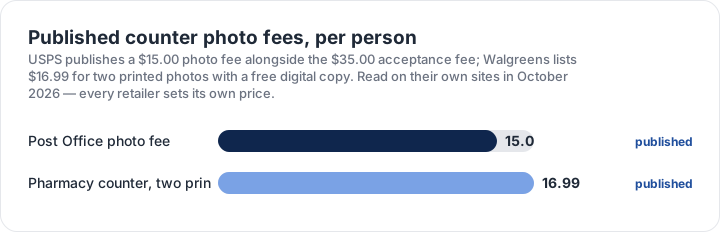
On price, two published fees could be re-read in October 2026: a $15.00 photo fee published by the United States Postal Service alongside its acceptance service, and $16.99 listed by a national pharmacy chain for two printed photos with a digital copy included. Every retailer sets its own price and most do not publish one, so treat those two figures as landmarks rather than a price list, and ask at the counter before the photo is taken.
Routes two and three: an app or your own camera
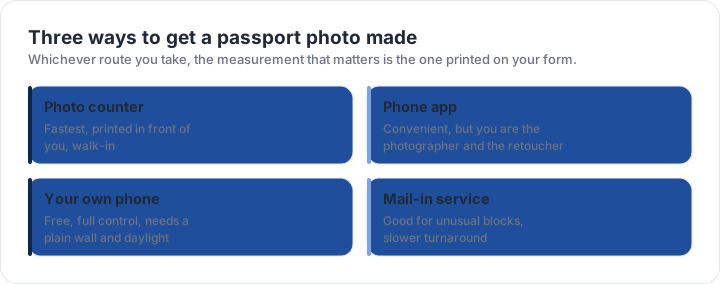
A phone app crops an existing photograph to a stated block, resizes it to the right pixel window and compresses it under a kilobyte ceiling. If you already have a usable photo — plain background, even light, head in the band — an app turns it into a file a form will accept, usually in a minute. What an app cannot do is change the photograph itself: expression, shadow and glare all survive the crop.
Your own camera and a plain wall cost nothing and give you full control of the photograph, which is an advantage when the block is unusual or the light is difficult. The trade-off is that you are the photographer and the person being photographed, and framing at arm’s length tends to leave the head too small. A helper, a shelf at eye level and a timer solve that, and the at-home guide walks through the setup.
The fourth route: a mail-in service
A mail-in or online service takes a photograph you already have, or one you take to its instructions, and returns a print in the exact block — useful when a local counter cannot set a size and a self-service machine has no presets for it. Turnaround is measured in days rather than minutes, the photo leaves your device, and the price varies by order rather than per person. It is the right route for an unusual block with time to spare, and the wrong route for an appointment tomorrow.
Whichever route you choose, the measurement that decides acceptance is the one printed on your form. The size matrix lists every block on this site, the route comparison puts the four options side by side, and the checker measures the photo you end up with before you file it.
Choosing a route for the deadline you have
- Today or tomorrowCounter — printed while you wait, no shipping time.
- A few days, photo already takenAn app or a mail-in service, depending on the block.
- Unusual block sizeA counter with manual entry, or a mail-in service that sets sizes exactly.
- Privacy firstYour own camera and a browser checker; nothing leaves the device.
- Several people at onceA counter is usually the most efficient; each print is priced per person.
Cost is not the same as value here. A free photo that fails the head band costs a second appointment and a fee, while a paid photo printed in front of you can be re-shot immediately if a shadow appears behind the shoulder. The cheapest route is the one that produces a photo you never have to redo.
| Requirement | What the official rule says | |||||||
|---|---|---|---|---|---|---|---|---|
| ('Country / document', 'United States — U.S. passport — printed photo') | ('Printed size', '51 × 51 mm (2 × 2 in)') | ('Head height', '25–35 mm chin to top of head') | ('Digital upload', 'Not applicable — this one is filed on paper') | ('File format & size', 'Photo paper, no file limits') | ('Background', 'Plain white or off-white, no shadows') | ('Recency', 'Taken within the last 6 months') | ('Glasses', 'No glasses — the rule changed in November 2016') | ('Official source', 'Official page') |
| ('Country / document', 'United Kingdom — UK passport — digital photo') | ('Printed size', '35 × 45 mm') | ('Head height', '29–34 mm chin to top of head') | ('Digital upload', '600 × 750 px minimum') | ('File format & size', 'JPG, JPEG, PNG, under 10 MB') | ('Background', 'Plain light-coloured background, no objects behind you') | ('Recency', 'Taken in the last month') | ('Glasses', 'No glasses (remove them if you can do so without discomfort)') | ('Official source', 'Official page') |
| ('Country / document', 'Canada — Canadian passport — printed photo') | ('Printed size', '50 × 70 mm') | ('Head height', '31–36 mm chin to top of head') | ('Digital upload', 'Not applicable — this one is filed on paper') | ('File format & size', 'Photo paper, no file limits') | ('Background', 'Plain white or light-coloured background') | ('Recency', 'Taken within the last 6 months') | ('Glasses', 'Dark glasses and tinted lenses not accepted; clear prescription glasses must not hide the eyes') | ('Official source', 'Official page') |
| ('Country / document', 'China — Chinese visa — printed photo') | ('Printed size', '33 × 48 mm') | ('Head height', 'Not specified as a fixed band — keep the head centred and uncropped') | ('Digital upload', 'Not applicable — this one is filed on paper') | ('File format & size', 'Photo paper, no file limits') | ('Background', 'Plain white background') | ('Recency', 'Taken within the last 6 months') | ('Glasses', 'No glasses; no headwear except religious headwear') | ('Official source', 'Official page') |
Specification source: https://travel.state.gov/content/travel/en/passports/how-apply/photos.html · checked October 2026 · DS-11, DS-82 by mail, and any paper application.
Specification source: https://www.canada.ca/en/immigration-refugees-citizenship/services/canadian-passports/photos.html · checked October 2026 · Paper application, 2 identical photos.