Passport photo sizes and a free checker
Every passport and visa photo is a block of millimetres with a head-height band inside it. This site lists those numbers straight from the official pages, then measures your own photo against them — in your browser, with nothing uploaded.
✓ Official sources linked✓ Checked October 2026✓ Your photo never leaves the browser
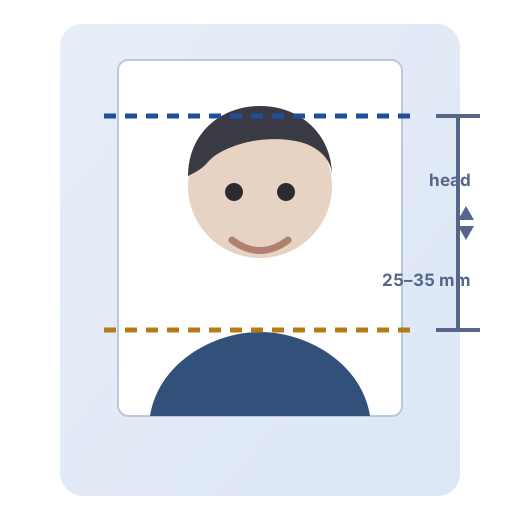
Drop a photo here, or click to choose one
JPG, PNG or HEIC · processed on this device only · no upload, ever
Keyboard: focus the photo, then arrow keys move the top-of-head line and shift plus arrow keys move the chin line.
Start where you are
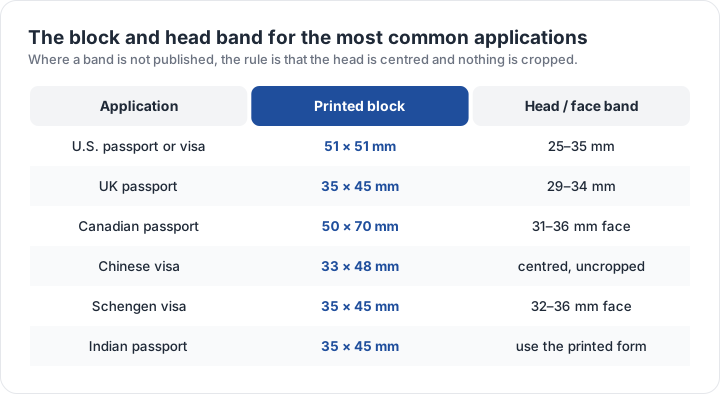
| Document | Photo block | Head height | Background | Checker |
|---|---|---|---|---|
| U.S. passport — printed photo | 51 × 51 mm | 25–35 mm | Plain white or off-white, no shadows | Check |
| UK passport — digital photo | 35 × 45 mm | 29–34 mm | Plain light-coloured background, no objects behind you | Check |
| Canadian passport — printed photo | 50 × 70 mm | 31–36 mm | Plain white or light-coloured background | Check |
| Indian passport — printed photo | 35 × 45 mm | centred | Plain white background | Check |
| Chinese visa — printed photo | 33 × 48 mm | centred | Plain white background | Check |
| Schengen visa — printed photo | 35 × 45 mm | 32–36 mm | Plain light background | Check |
| Japanese passport — printed photo | 35 × 45 mm | centred | Plain background, no shadows | Check |
| Australian passport — printed photo | 35 × 45 mm | centred | Plain light background | Check |
What a passport photo actually is
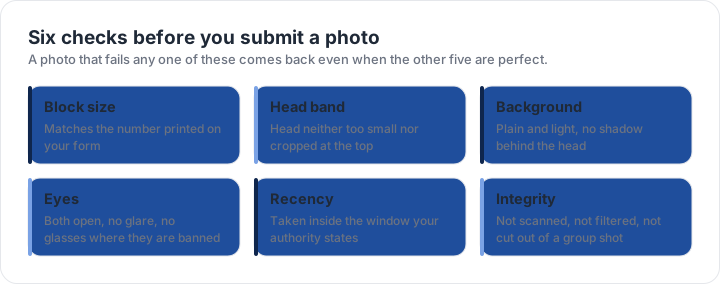
A passport photo is not a portrait. It is a measuring instrument: a fixed block of millimetres that lets a border officer, a consular clerk or a face-matching system confirm three things — that you are the person in the book, that your face has not changed beyond recognition, and that the image has not been edited. Every rule that follows exists to protect one of those three jobs. That is why the background must be plain rather than pretty, why the head must fill a specific band rather than look flattering, and why glasses were banned outright in the United States in November 2016: glare across the eye makes the eyes unmatchable.
The consequence is that most rejected photos fail on geometry, not on quality. A phone photo taken at arm's length in a bright room is usually sharper and better exposed than a photo-booth print — and still rejected, because the head occupies 42 per cent of the frame instead of the required band, or because the wall three metres behind the subject was a pale blue that reads as a colour cast at the edges. The measurable things are the ones that get applications returned, and measurable things can be checked in advance.
That is the whole idea behind the checker on this site. Drop in a photo, choose the document you are applying for, and it reports the block size against the official figure, the head height between the guide lines you position, the lightness and evenness of the background, whether the image has gone monochrome, and whether the file is inside the format and kilobyte limits for a digital submission. It runs entirely in the browser using the canvas element, which means the photo is never transmitted anywhere and there is no copy of it on a server to lose. Close the tab and it is gone.
How the numbers on this site are kept right
Photo specifications change with almost no fanfare. The United States banned glasses in 2016; the United Kingdom tightened its rule to "taken within the last month"; online renewal introduced a 54 KB floor that did not exist when everyone filed on paper. Each page here carries the official source it was built from and the date it was last checked, and the methodology page explains how that check is performed. Where a figure is widely published but could not be re-confirmed against the official page in the latest sweep, the page says so and sends you to the authority rather than pretending to certainty.
Where to start
If you know your document, go straight to its page: the US passport requirements, the UK photo rules, the Canadian 50 × 70 mm block, or the 33 × 48 mm Chinese visa photo. If you do not know it, the photo size matrix lists every country and document on the site in one table. If you have a photo in front of you and want to know whether it will survive the counter, run it through the checker first — it takes about ten seconds and it cannot cost you a second appointment.
Frequently asked questions
What size is a passport photo?
It depends on the country. The United States prints 2 × 2 in (51 × 51 mm), most of Europe and the United Kingdom use 35 × 45 mm, Canada uses 50 × 70 mm and a Chinese visa photo is 33 × 48 mm. Every size on this site is read from the official page listed with it, and the size matrix puts them side by side.
Can I take my own passport photo at home?
Yes for most applications. A phone at arm’s length, daylight and a plain wall is enough for a photo that passes, as long as the head fills the right band and nothing casts a shadow. The at-home guide covers light, distance and the print sheet.
Is the photo checker free, and does it upload my photo?
It is free with no account and no limit, and nothing is uploaded. The file is read by your own browser, drawn into a canvas and measured there, so the image never leaves your device. See the checker for what it measures and what it cannot.
Why do passport photos get rejected?
Almost always geometry or an exclusion rather than image quality: the head sits outside the required band, the background is not plain, or the photo contains something the rule forbids such as glasses in the United States. The ten most common faults are ranked on the rejection page.
Do passport photos need a white background?
White or off-white is right for the United States; the United Kingdom specifies cream or light grey. What fails everywhere is a shadow, a colour cast or a background that is not even across the frame, which is why the checker reads the edge pixels rather than the middle.
How recent does a passport photo have to be?
The United States asks for a photo taken within the last six months, and the United Kingdom within the last month. Canada also works to a six-month window. If the photo is older than the window, or your appearance has changed, take a new one.
How many passport photos fit on one print?
A standard 4 × 6 in print holds six 2 × 2 in photos, and a 10 × 15 cm print holds eight 35 × 45 mm photos. The checker’s print sheet lays your photo out at the block size so a print shop can run it without resizing.