How to use it
- Choose your documentThe preset comes from the same specification table as the guide pages.
- Drop in a photoAny JPG, PNG or HEIC file; it is read in the browser and never sent anywhere.
- Drag the two guide linesPlace one on the top of the head and one on the chin, and read the height.
- Read the reportEach published rule is listed with a pass, a warning or a fail, and the reason.
- Download a print sheetA PNG laid out for printing, with the photo placed at the block size.
The guide lines are the part that cannot be automated. Software cannot reliably find the top of the head or the chin in an arbitrary photograph, because hair, headwear and backgrounds vary too much — so the checker asks you to place two lines and then does the arithmetic. The eye line is then calculated from the band, which is why it moves when you move the chin line.
What it measures
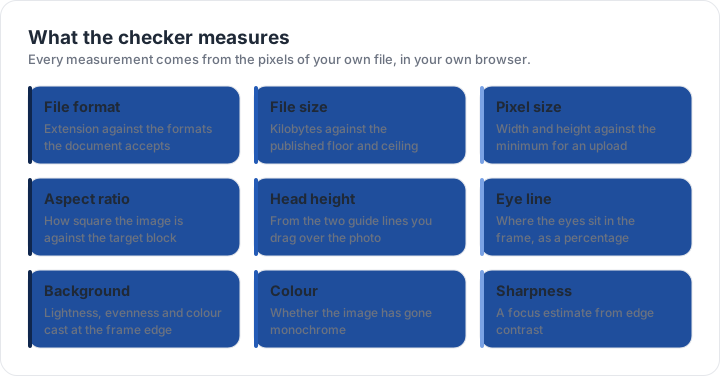
Nine things, all from the pixels of your own file. The file format against the formats the document accepts. The file size in kilobytes against the published floor and ceiling. The pixel dimensions of both sides against the minimum for an upload. The aspect ratio against the target block, with two levels of tolerance — a strict band for people who want the block exact, and a looser one for photos that are close.
The head height between the guide lines, in proportion to a block of the stated size. The eye line, as a percentage of the image height. The background, read at the frame edge for lightness, evenness and colour cast. Whether the image has gone monochrome, which several countries do not accept. And a sharpness estimate from edge contrast, which catches a file that has been compressed one step too far.
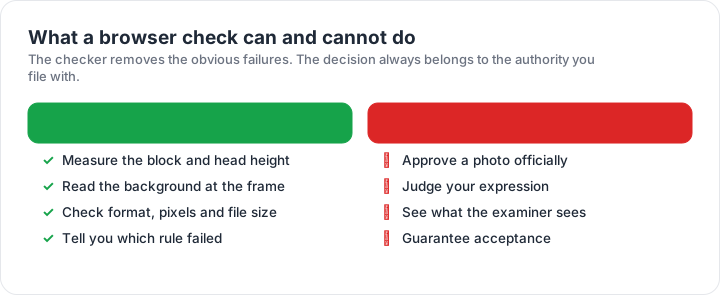
The checker reports measurements, not approval. It tells you which published rule your file fails and by how much, from the pixels of the file in your browser. The decision always belongs to the authority you file with.
What a browser check cannot do
It cannot approve a photo. Measurements are not a decision, and no tool can promise what an examiner will do with an image. It cannot judge your expression, tell whether the photograph is recent, or see whether you are wearing something the rule excludes. Those are things you check by looking at the photograph and at the form.
It also cannot see what the examiner sees in one specific sense: the checker reads the file you have, and an upload screen may re-compress it on arrival. That is why the file size and format checks are reported as ranges rather than as a single verdict, and why the sharpness estimate is described as an estimate. Where a rule cannot be measured, the report says so rather than guessing — and the guide page for your document covers that rule in words.
Why nothing is uploaded
The checker is a single JavaScript file. It reads your photo with the browser’s own file reader, draws it into a canvas element and measures the pixels of that canvas. No request containing your photo is made, because no part of the tool is designed to make one, and there is no upload endpoint to send it to.
The only things it remembers are stored locally on your device: the last document you selected and a short list of checks you ran during the visit, so the page is useful if you come back to it. Clearing site data removes both instantly. If you want the rules in words before you use the tool, the size matrix lists every block, the rejection page covers the faults the checker cannot see, and how we verify explains where the numbers come from.
| Requirement | What the official rule says | |||||||
|---|---|---|---|---|---|---|---|---|
| ('Country / document', 'United States — U.S. passport — printed photo') | ('Printed size', '51 × 51 mm (2 × 2 in)') | ('Head height', '25–35 mm chin to top of head') | ('Digital upload', 'Not applicable — this one is filed on paper') | ('File format & size', 'Photo paper, no file limits') | ('Background', 'Plain white or off-white, no shadows') | ('Recency', 'Taken within the last 6 months') | ('Glasses', 'No glasses — the rule changed in November 2016') | ('Official source', 'Official page') |
| ('Country / document', 'United States — U.S. passport — digital upload') | ('Printed size', '51 × 51 mm') | ('Head height', '25–35 mm chin to top of head') | ('Digital upload', '600 × 600 px minimum, up to 1200 px') | ('File format & size', 'JPG, JPEG, PNG, HEIC, HEIF, under 10 MB') | ('Background', 'Plain white or off-white, no shadows') | ('Recency', 'Taken within the last 6 months') | ('Glasses', 'No glasses') | ('Official source', 'Official page') |
| ('Country / document', 'United Kingdom — UK passport — digital photo') | ('Printed size', '35 × 45 mm') | ('Head height', '29–34 mm chin to top of head') | ('Digital upload', '600 × 750 px minimum') | ('File format & size', 'JPG, JPEG, PNG, under 10 MB') | ('Background', 'Plain light-coloured background, no objects behind you') | ('Recency', 'Taken in the last month') | ('Glasses', 'No glasses (remove them if you can do so without discomfort)') | ('Official source', 'Official page') |
| ('Country / document', 'United States — DV lottery entry — digital photo') | ('Printed size', '51 × 51 mm') | ('Head height', '25–35 mm chin to top of head') | ('Digital upload', '600 × 600 px minimum, up to 1200 px') | ('File format & size', 'JPG, JPEG, under 0 MB') | ('Background', 'Plain white or off-white background') | ('Recency', 'Taken within the last 6 months') | ('Glasses', 'No glasses') | ('Official source', 'Official page') |
Specification source: https://travel.state.gov/content/travel/en/passports/how-apply/photos.html · checked October 2026 · DS-11, DS-82 by mail, and any paper application.
Specification source: https://travel.state.gov/content/travel/en/passports/how-apply/photos.html · checked October 2026 · Online renewal and other digital submissions.
Specification source: https://www.gov.uk/photos-for-passports/rules-for-digital-photos · checked October 2026 · HM Passport Office online application.
Specification source: https://dvprogram.state.gov/ · checked October 2026 · Diversity Visa programme entry.